

How does this system work?
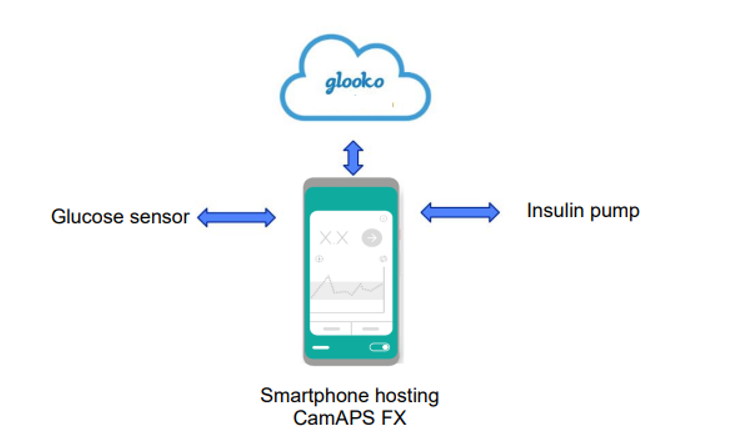
This Hybrid Closed Loop (HCL) system is made up of 3 parts:
- An insulin pump (YpsoPump)
- A continuous glucose monitor (CGM) which consists of a sensor (Dexcom G6 or Libre 3) and transmitter (for Dexcom G6 only)
- The mylifeCamAPS FX algorithm running on an android smart device. This app takes data from the pump and the sensor and adjusts the insulin delivery automatically. This mode is called “AutoMode”. The data is automatically uploaded to a ‘cloud’ on a platform called Glooko.
Your pump will deliver insulin in 3 ways:
- As basal - an ever-changing amount of insulin (adjusted every 5 minutes) according to the glucose information received from the CGM.
- With food - you will continue to give a bolus of insulin for food eaten using the bolus wizard (with pre-programmed insulin to carbohydrate ratios).
- As corrections suggested by the pump and delivered by the user. You may notice that the correction suggested by the system is less than you would normally take. This is because the system will have also increased the basal rate to compensate for the raised blood glucose levels.
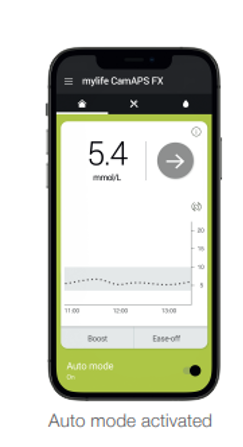
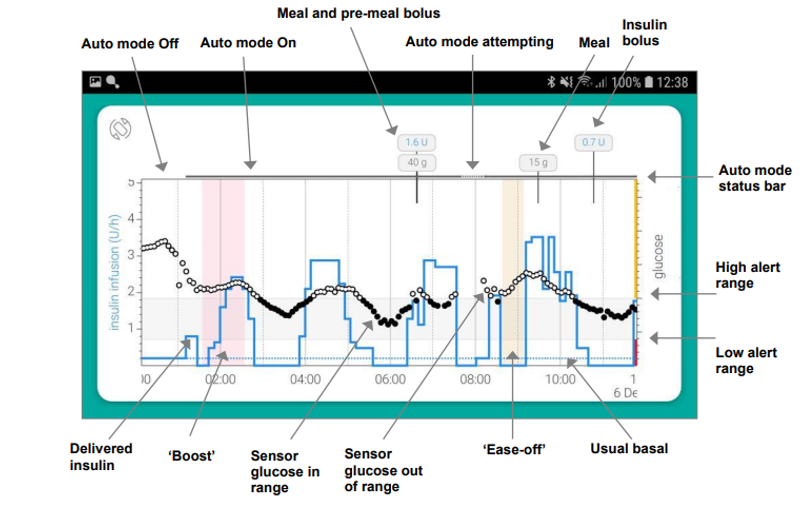
This system is predominately reactive. It is able to keep your glucose in target when things are stable but it is not as responsive to rapid or bigger changes to glucose levels with exercise or after carbohydrate. You will still need to give timely and accurate bolus insulin for carbohydrates, adjust for exercise and be aware of active insulin on board when exercising or treating hypoglycaemia.
What settings can I adjust on the pump?
In manual mode with or without the sensor running, all settings on the pump can be adjusted, both basal and bolus settings as usual.
In AutoMode, the following settings can be adjusted to affect insulin delivery:
- Carbohydrate ratios
- Personal Glucose Targets – between 4.4 - 11.1mmol/L (default is 5.8mmol/L)
- Ease off / Boost (discussed later)
Getting started
- This technology can initially be demanding of your time and attention. You may find that there are more alerts initially whilst you become familiar with the system – these might be requests for calibrations, hypoglycaemia alerts, lost sensor alerts or the system requesting attention and further information. Be patient and keep in contact with your educator – it can take a few weeks to really understand how the system operates and to see if adjustments to your basic pump settings are needed. Listed below are links to videos for set and sensor placement.
- If there is an interruption in the sensor data and/or the system is not happy with the glucose data it is receiving then it may come out of HCL and run in the usual manual mode using your programmed settings.
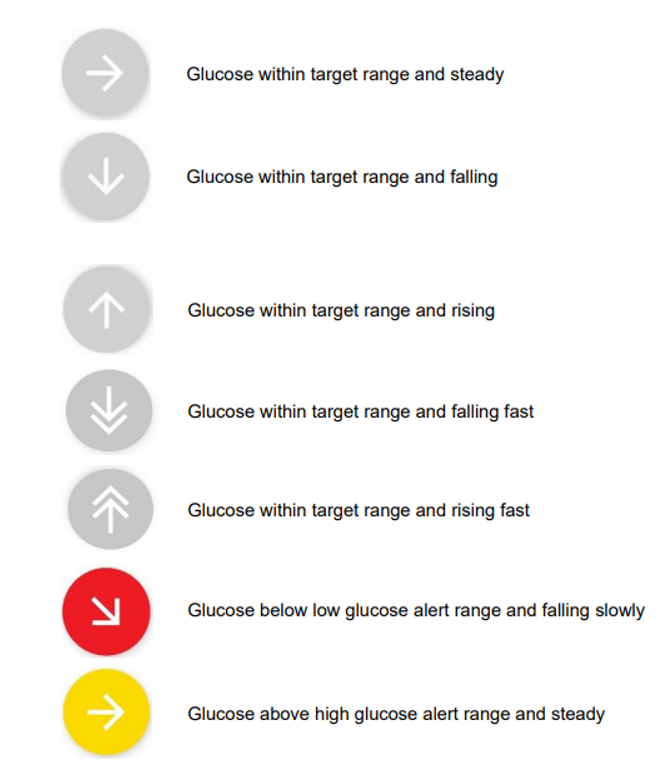
What do the sensor trend arrows mean?
The following table may help you to interpret what the directional arrows of the sensor mean and how your glucose levels are changing:
Top 10 Tips for using the mylife loop system
1. Get the basics right
2. Meal bolus timing and carbohydrate counting
Recommendations are 10-15 minutes before eating. Late meal boluses can lead to high post meal glucose levels followed by hypoglycaemia as Auto mode will compensate if it detects a rapidly rising sensor glucose. Aim to be as accurate as you can with carbohydrate counting.
If a bolus is late / forgotten, consider giving ±50% of the calculated bolus or using ‘Boost’ to help correct the high as the algorithm will have increased insulin delivery to cover some of the meal already.
For slowly absorbed meals – often higher fat, protein and / or very low GI meals – consider splitting the bolus, and add the remaining amount of carbs in the ‘add meal’ function AND choosing ‘slowly absorbed meal’. Auto mode will deliver additional insulin, if required, every 30 minutes for the next 3-4 hours in response to rising glucose levels. You will see 6 green triangles on Glooko when this is used.
3. Treating hypoglycaemia – generally less hypo treatment is required on these systems than on standard insulin regimens. Reviewing sensor arrows and insulin on board can help guide the amount of carbohydrate required, if any. A good starting point would be 4g carbohydrate if 1 down arrow and 8g carbohydrate if 2 or 3 down arrows. These systems will alert you that you are heading towards a hypo; the system will already have reduced or stopped insulin delivery to avoid the hypo and you should try to resist acting too quickly with carbohydrate top ups as this can result in overtreatment. The low alert sound is a prompt to monitor your glucose more carefully and see if the system is levelling the glucose out or if you do need a small carbohydrate top up (3-7g) as well.
Don’t forget to tick “hypo treatment” in the “add meal” menu on the CamAPS FX app to capture the amount of hypo treatment taken. Doing this will show the treatment on the Glooko data to help look for patterns, but also alter the system so it knows those carbohydrates are hypo treatment.
4. Optimising your CGM performance – refer to your sensor manufacturer and/or discuss with your educator which areas are good to place your sensor, usually on your tummy or back of the arm. It is worth investing in medical adhesive (Skintac®, tincture of benzoin) to ensure the sensor remains in place for the full duration of use. Avoid using sensors beyond their intended life span. NB Paracetamol can interfere with sensor readings; it would be advisable to monitor the accuracy of your sensor with additional fingerpricks when taking paracetamol.
5. Managing sick day rules – Auto mode may not manage well during illness as it is not able to meet the increased need for insulin. Consider using the ‘boost’ function which can be set for up to 13 hours at a time and delivers approximately 35% more insulin. For periods of illness where ketones are raised (ketones 1.5mmol/L or above), a return to manual mode following sick day rules guidance in the pump handbook is recommended. This will involve the use of manual boluses and temporary basal rates which are not available in HCL. Manual mode may also be the recommended option should a period on steroids therapy be required. Contact your team for advice.
6. Plan ahead for physical activity.
Physical activity is best managed either by:
- Using ‘ease off’ function at least 60-90 minutes before planned activity, running it during the activity and potentially for a few hours afterwards. This temporarily reduces insulin delivery depending on glucose levels by raising the personal glucose target, softening the algorithm’s calculations and stopping insulin delivery earlier to reduce the risk of hypos.
- Drizzling in small amounts of carbohydrate directed by downward sensor arrows or a combination of both. Avoid pre-loading with carbohydrate before exercise as this does not work in these systems as the resulting rise in blood glucose activates the HCL at the start of exercise which can lead to hypoglycaemia.
- Using a combination of ease off and drizzling in carbohydrate.
7. Managing alcohol – there is not much available information on managing alcohol in HCL and there may be a greater tendency towards hypoglycaemia if more alcohol has been consumed than is usual. In these situations, switching to manual mode, using reduced temporary basal rates and a bedtime snack would be recommended.
8. Suspending the pump – you should suspend the pump if disconnecting for longer than 15 minutes to avoid the system accounting for insulin not delivered which can affect the algorithm’s learning.
9. Avoid over-riding the system – you may have been tempted in the past to add pretend carbohydrates to your pump to bring a high blood glucose down when corrections haven’t worked well enough. This approach does not work in HCL and will increase the risk of a hypo.
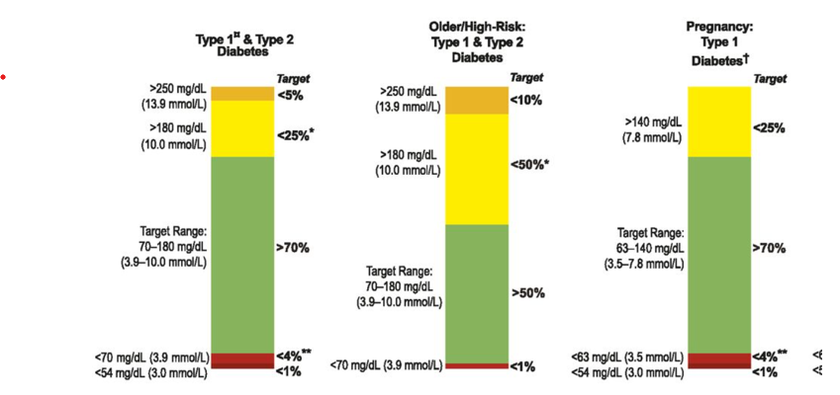
10. Review the data – you can get a lot of data when using HCL. Over time this will become more familiar and useful to you. Your educator can help you interpret what the reports mean and how to make adjustments. The reports also present your glucose data in a different way; in addition to predicted HbA1c you will get time in range. You are aiming for at least 70% time in range (3.9-10 mmol/L) with less than 3% below 3.9mmol/L and less than 1% below 2.8mmol/L. Every 1% more time in range is the same as another 15 minutes with blood glucose in range so even small changes make a difference to your health.
Overview of the system:
Website:
mylife-loop (opens in a new tab)
Infographic (opens in a new tab)
You tube videos for CamAPS FX app: Youtube CamAPS FX videos (opens in a new tab)
CamAPS FX online training: Camdiabtraining (opens in a new tab)
You need to register and once logged in you can access a whole host of resources including the essential training module that must be completed to access the training code for the app, webinars and factsheets
We are smoke-free
Smoking is not allowed anywhere on the hospital campus. For advice and support in quitting, contact your GP or the free NHS stop smoking helpline on 0800 169 0 169.
Other formats
Help accessing this information in other formats is available. To find out more about the services we provide, please visit our patient information help page (see link below) or telephone 01223 256998. www.cuh.nhs.uk/contact-us/accessible-information/
Contact us
Cambridge University Hospitals
NHS Foundation Trust
Hills Road, Cambridge
CB2 0QQ
Telephone +44 (0)1223 245151
https://www.cuh.nhs.uk/contact-us/contact-enquiries/