
From March 2026, a phased rollout will begin where outpatient appointments at our hospitals for patients aged 16+ will show under the ‘Upcoming and past appointments’ section of the NHS App.
This will enable you to view details of your upcoming appointments at our hospitals (Addenbrooke’s and The Rosie) alongside appointments you may also have at other hospitals all through the NHS App.
Appointments at our hospitals will show the clinical specialty, date and time, and location/type of appointment, with (upon your consent) seamless and secure access through to your Cambridge University Hospitals’ (CUH) MyChart patient portal account, enabling you to...
- manage your appointments
- complete pre- appointment information
- electronically check-in for your appointments
- interact with your medical record and clinical teams at our hospitals as usual.
All patients will be asked to consent within the NHS App for their NHS login details to be shared with CUH to access their MyChart account or used to set them up a MyChart account if they do not already have one.
This digital connection supports the NHS Long Term Plan by making it easier for patients to manage their healthcare, view all their appointments in one place (particularly useful for patients with appointments at multiple hospitals), and use the NHS App as a “digital front door” to access their health information via linked hospital patient portals.
Video: NHS App connection with MyChart
Link: https://youtu.be/nDWSfwYOG8w
Using the NHS App to view your outpatient appointments
The NHS App offers a single, convenient place to view appointment information – especially helpful if you also receive care at other hospitals.
It provides an additional way for you to access your MyChart account directly from your appointment information shown in the NHS App.
You can however continue to access your MyChart account directly through the MyChart app or MyChart website (opens in a new tab) - exactly as you do now.
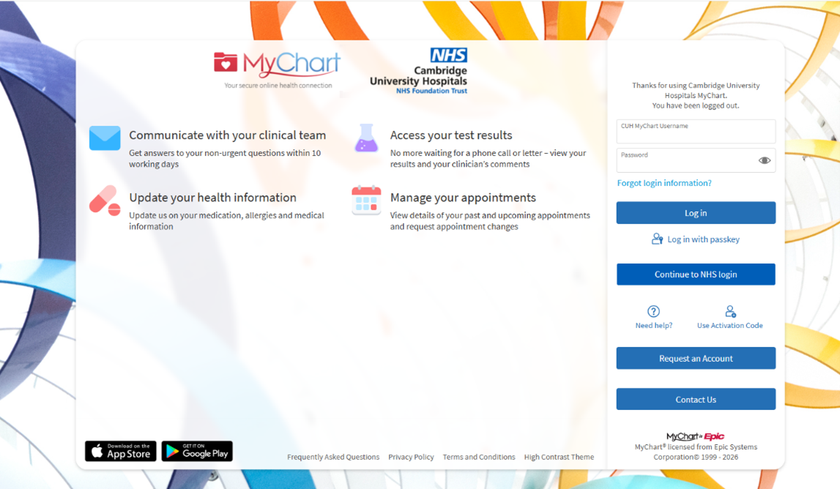
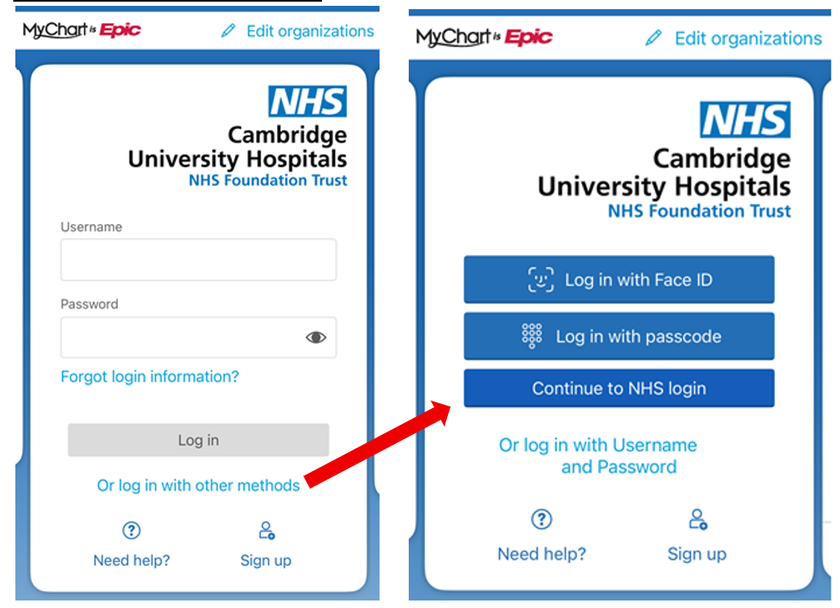
There will also be an additional option ‘Continue to NHS login’ allowing you to log into MyChart directly using your NHS login (NHS App email and password) if you prefer.
If you don’t have a MyChart account
Even without MyChart, you will still be able to see your appointment details at our hospitals within the NHS App. This is because appointment information will be securely shared from our hospitals’ electronic patient record system to the NHS App.
When you view appointment details at our hospitals in the NHS App, you will be asked whether you consent for your NHS login details to be shared with CUH to create you a MyChart account.
Having a MyChart account will allow you to:
- view your hospital information and full appointment details
- complete pre appointment questionnaires / information appointment
- access the full range of MyChart features to help you manage your care.
Logging into MyChart directly
You can access your MyChart account directly via the MyChart app or website.
Log in with either:
- your existing MyChart username and password, face ID or passcode
Or
- your NHS login details (email address and password used for the NHS App) via the ‘Continue to NHS login’ button on the website (‘Or log in with other methods’ link in the MyChart app).